
Moving services to the cloud doesn’t remove the infrastructure: it extends it. Some of the applications and data now run in Azure, AWS or Google Cloud, some stay in the office, and both must work as a single network, with the same security, the same identity and a shared backup strategy. When this isn’t designed, the cloud inherits the local network’s problems and adds its own: services exposed to the internet, improvised connectivity, runaway costs and backups in the same place as the data.
This guide sets out the technical criteria we apply when designing hybrid infrastructure for businesses: what to move to the cloud, how to connect it to the office, how to design the virtual networks, DNS resolution, identity, backup and cost control.
Contents
- What to move to the cloud and what to keep on-premises.
- Connectivity between the office and the cloud.
- Addressing plan.
- Virtual network design.
- Hybrid DNS.
- Identity and permissions.
- Backup and continuity.
- Costs, governance and monitoring.
1. What to move to the cloud and what to keep on-premises
Not every workload benefits equally from the cloud. The decision should be made application by application, considering the latency it tolerates, the volume of data it moves with users, its licensing, its dependencies on other systems and what it costs to run in each environment.
- Good candidates for the cloud: applications with distributed or mobile users, services with variable demand, development and test environments, and off-site backups.
- Candidates to stay on-premises: systems that exchange large volumes of data with office workstations, equipment with a physical dependency (industrial control, CCTV, production systems) and legacy applications that aren’t worth the cost of adapting.
Rule of thumb: before migrating, inventory the applications and their data flows. A server that moves to the cloud but still exchanges heavy files with the office every day shifts the problem onto the internet link and generates egress costs nobody had planned for.
2. Connectivity between the office and the cloud
Access to private cloud resources should go over an encrypted channel between the office network and the virtual network, without exposing services to the internet. There are two main approaches:
- Site-to-cloud IPsec VPN: between the office firewall and the provider’s VPN gateway (Azure VPN Gateway, AWS Site-to-Site VPN, Google Cloud HA VPN). It’s the usual option for most businesses. Providers offer redundant tunnels and you should configure all of them, ideally with dynamic BGP routing.
- Dedicated interconnect: a private circuit to the provider (Azure ExpressRoute, AWS Direct Connect, Google Cloud Interconnect), suited to high bandwidth, predictable latency or compliance requirements that rule out transit over the internet.
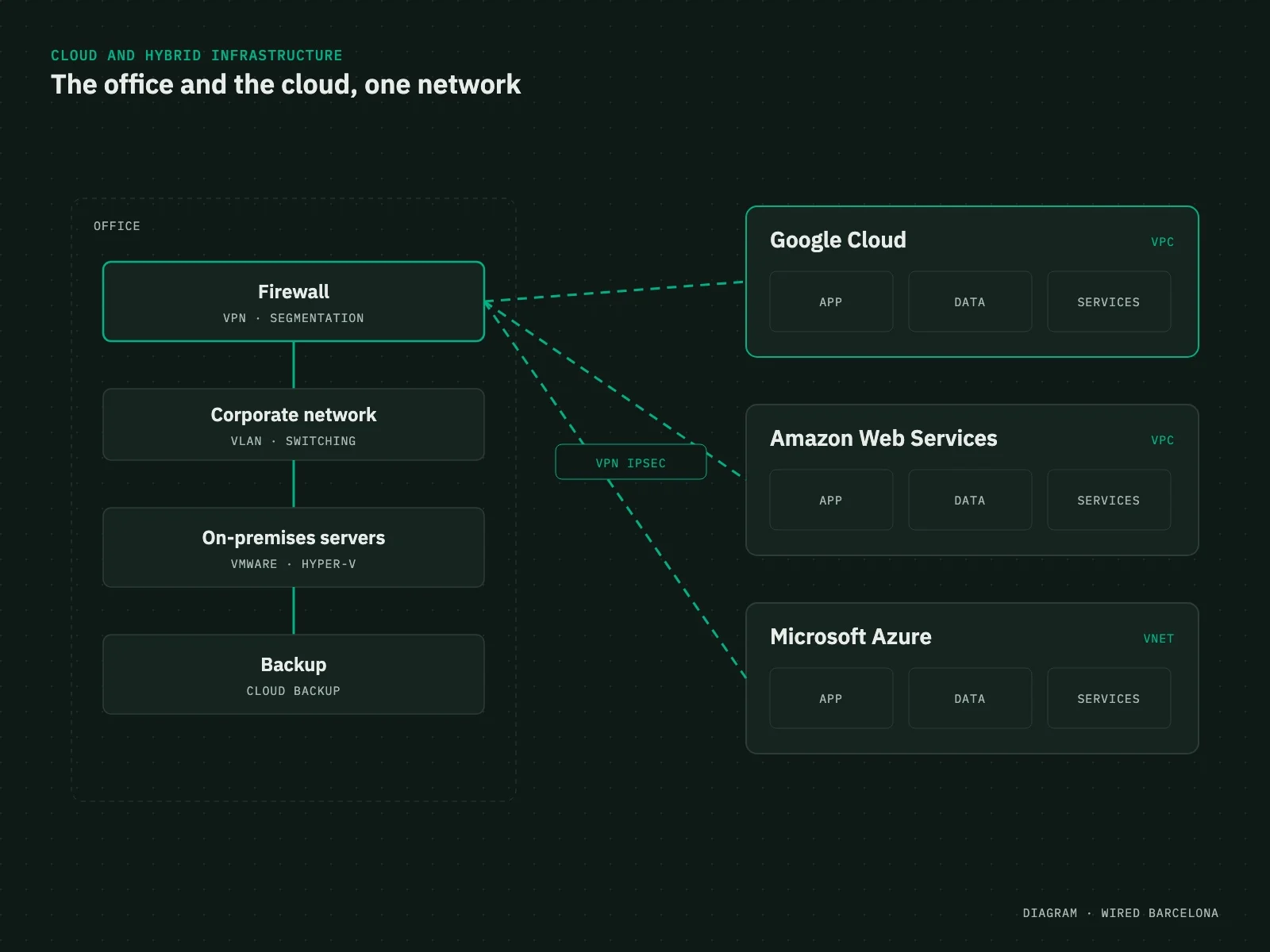
Rule of thumb: in a hybrid architecture, the office’s internet connection becomes a critical component: if it goes down, users lose access to the applications running in the cloud. That’s why WAN redundancy, with two carriers or a 5G backup and automatic failover, is part of the design, not an add-on. We explain it in the guide on connectivity outages.
3. Addressing plan
One of the costliest mistakes to fix is overlapping IP ranges. If the cloud virtual network uses the same range as the office, a remote site or the typical home network of remote workers, routing between them isn’t possible without NAT, with all the complexity that brings. Re-addressing a virtual network in production means redeploying resources.
Rule of thumb: define a global addressing plan before creating the first virtual network, assigning non-overlapping blocks to the office, each site, each virtual network and each environment (production, test), and avoiding the ranges most common on home networks. Document it and leave room to grow.
4. Virtual network design
A VPC or VNet is a network, and it’s designed on the same principles as the office one. It’s common to find virtual machines with public addresses and remote access exposed to the internet, all in a single subnet with permissive inbound rules created at go-live and never reviewed.
- Subnets by role: separate public front ends, applications, databases and management, with most resources in private subnets with no public address.
- Filtering: Security Groups or Network Security Groups with least privilege, deny by default, referencing groups rather than broad ranges.
- Controlled internet egress: through a NAT gateway or cloud firewall, so private resources can update without being reachable from outside.
- Admin access: RDP and SSH never open to the internet; access through the VPN or a managed bastion service.
- Managed services over private networking: databases and storage reached through private endpoints instead of their public addresses.
The principles are the same as on the local network, and we cover them in the network segmentation guide.
5. Hybrid DNS
Name resolution causes more incidents in hybrid environments than anything else, and is one of the least planned. Office devices need to resolve the private names of cloud resources, including managed services’ private endpoints, and cloud resources need to resolve names in the office’s internal domain. If it isn’t configured, clients resolve the service’s public address instead of the private one and traffic goes out over the internet or fails.
Rule of thumb: conditional forwarding in both directions. In the cloud, through the provider’s hybrid resolution service (Azure DNS Private Resolver, Amazon Route 53 Resolver with inbound and outbound endpoints, Google Cloud DNS forwarding zones); in the office, conditional forwarders on the internal DNS servers pointing to those endpoints. Check resolution from both sides before migrating each service.
6. Identity and permissions
In the cloud, identity is the perimeter: whoever gets credentials with enough permissions can create, change or delete entire infrastructure from anywhere. Common findings are root or owner accounts used day to day, credentials shared between several people, long-lived access keys in scripts and admin permissions granted for convenience.
- Centralised identity, integrated with the corporate directory where there is one, and mandatory MFA for all admin access.
- Root or owner account protected and kept for emergencies.
- Role-based permissions with least privilege and periodic review.
- Service identities or roles for applications instead of static keys.
- Environments separated into different accounts, subscriptions or projects.
7. Backup and continuity
Running a service in the cloud doesn’t mean its data is protected. The provider’s high availability protects against failures in its infrastructure, not against accidental deletion, a configuration error or a ransomware attack that encrypts or deletes data with legitimate credentials. A backup stored in the same account with the same permissions as the original data can be lost in the same incident.
Rule of thumb: define RPO and RTO per service and design backups accordingly: at least one copy separate from the main infrastructure, in another account, region or provider, with immutability or locked retention so it can’t be deleted from production. The same applies the other way round: on-premises servers need an off-site copy. Above all, test restores regularly: a backup that’s never been restored is no guarantee.
8. Costs, governance and monitoring
In the cloud, every forgotten resource keeps billing. Typical cost overruns come from oversized machines, test resources nobody deletes, unattached disks and IP addresses, piled-up snapshots and unplanned outbound data transfer.
- Mandatory tagging by project, environment and owner, to know what each resource is and who it belongs to.
- Budgets and cost alerts set up from day one.
- Periodic review of sizing against real usage and removal of orphaned resources.
- Infrastructure as code so every environment is reproducible and changes are logged.
- Unified monitoring: VPN tunnel status, office-to-cloud latency, service availability and network flow logs, integrated with monitoring of the local network.
The cloud is a network too
Addressing, segmentation, DNS, filtering and backups are the same old problems in a different environment. A hybrid infrastructure works when the office and the cloud are designed as one architecture, not as two separate projects.
When specialist help is needed
In our cloud and hybrid infrastructure projects we design the whole architecture: application analysis, addressing plan, connectivity with the office, secure virtual networks, identity, backup with defined RPO and RTO, and phased migration without stopping the business, on Azure, AWS or Google Cloud.
Because the cloud depends on how the office reaches it, we tackle it together with the network architecture and perimeter security, and bring it into monitoring. For an overall view of your infrastructure, you can use our network self-assessment.